Burn Guide - dust
- 4.9
- Rating
- 10.00K
- Installs
- Free
- Price

 Analysis by App-foxy
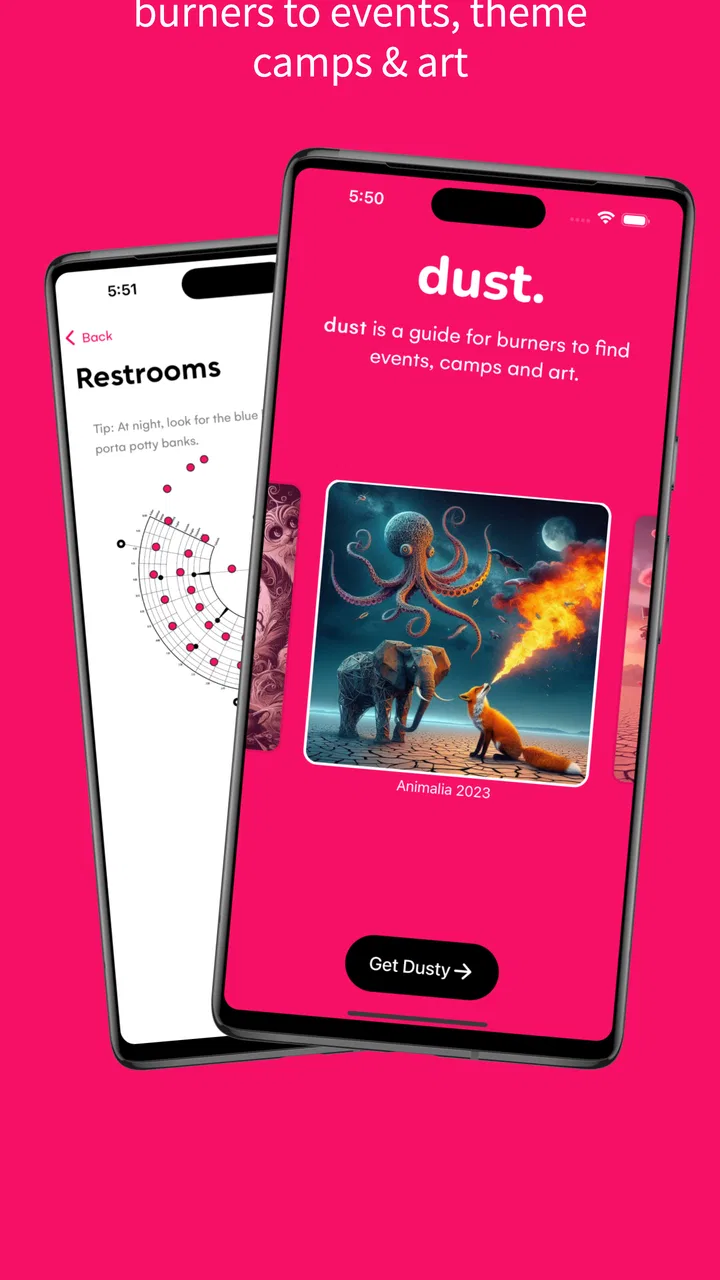
Burn Guide - dust is the kind of app I would rather have ready before arriving at a burn than try to discover in the middle of one. It is a free events app from WebNative LLC, built as an offline unofficial guide for Burning Man and regional burns. That focus gives it a clear purpose: it is not trying to replace every travel, messaging, map, or planning tool on a phone. Instead, it aims to keep useful burn information available when connectivity is unreliable and ordinary online habits become inconvenient.
After spending time with it, my main impression is that its value comes from preparation rather than constant entertainment. The app makes the most sense as a compact reference companion: something to check before leaving, revisit while planning a day, and keep available when a browser search is no longer dependable. I would recommend it most strongly to people attending a burn who want an offline guide close at hand, especially those who do not want their entire experience to depend on a live connection.
Why an offline burn guide is genuinely useful
The word “offline” matters more here than it would in many other event apps. At a normal concert or city festival, I can usually rely on venue Wi-Fi, mobile data, familiar map services, and a quick search engine. A remote desert event or regional burn creates a different set of practical problems. A page that loads perfectly during preparation may be much less helpful when I need information away from a stable signal. Having a guide designed around offline access changes the workflow from “find it when I need it” to “save the reference before I go.”
You May Also Like

 Blood Strike: 2.5 Anniversary
Blood Strike’s Loadouts Turn Every Drop Into a Tactical Gamble
A close look at Blood Strike’s custom loadouts: how fast access to signature weapons reshapes its battle royale rhythm, rewards preparation, and narrows the gap between fights.

 Pandora - Music & Podcasts
Pandora’s Music Is Easy to Start, but Harder to Recover
Pandora’s strength is its low-effort path from a seed to a station. Its weak spot is how much confidence it asks you to place in connection, setup, and quiet recovery.

 8 Ball Pool
 Is Built on Rivalries, Rematches, and Routine
A close look at the rivalries, rematches, shared routines, and unanswered safety questions that turn a quick pool match into a persistent mobile community.

 Samsung Music
’s Quiet Strength Is Playing What You Already Own
Its reach comes less from spectacle than from dependable access to a personal library. That simplicity is both the app’s strongest retention engine and its ceiling.

 AccuWeather: Weather Radar
AccuWeather Review: A Quick, Clear Forecast for Everyday Decisions
For everyday plans, the best forecast is the one you can understand quickly. AccuWeather makes rain timing, radar, and local conditions easy to act on, with a few trade-offs.

 Hill Climb Racing
Why Hill Climb Racing Still Turns Crashes Into One More Run
A tiny car, a bumpy hill and one more upgrade: Hill Climb Racing keeps resurfacing because its simple chaos makes every near-miss feel personal.
More From Our News Desk
View All News


That difference is easy to underestimate. I can use the app while still at home to become familiar with the information, then open it later without treating every question as a network task. That is particularly useful when deciding what to do next, checking event-related details during a pause, or helping a friend who has not prepared as carefully. The app’s role is modest but practical: it reduces the number of moments when I need to improvise with incomplete access to the internet.
I also like that the guide is unofficial. That label sets the right expectation. I do not approach it as the single authority for every decision, and I would still follow current instructions from event organizers, emergency personnel, and local authorities. At the same time, an unofficial guide can feel more like a participant-oriented companion than an official notice board. It is easier to treat it as a tool for orientation and planning rather than as a formal replacement for event communication.
Its store summary describes it as an offline unofficial guide for Burning Man and regional burns, while the short description simply calls it a burn guide. Those few words are more revealing than a long list of generic promises. The app is specialized, and that specialization is its strength. If I am not interested in burns, there is little reason to install it. If I am attending one, the narrow focus is much more useful than a broad events app that knows about concerts, conferences, and festivals but does not understand this particular kind of gathering.
How I would use it before leaving
My preferred workflow would be to install it while I still have dependable internet, open the relevant material, and spend a few minutes learning where the information is located. I would not wait until arrival to learn the interface. Offline tools reward a small amount of advance preparation: the more familiar I am with the guide beforehand, the less time I spend searching when I am tired, dusty, or in a hurry.
I would also treat the app as one layer of preparation rather than the whole plan. Important personal information, meeting arrangements, travel details, and safety supplies should not live only inside an event guide. A useful habit is to make a simple backup note for anything I absolutely need, then use dust for broader orientation and event reference. That trade-off is important because an offline guide can remain accessible while still not being the right place for every private or time-sensitive detail.
Another practical use is group planning. Before a trip, friends can each look through the guide and discuss what they want to prioritize. That is better than trying to make every decision spontaneously, especially when a group may split up during the day. I would still leave room for discovery, but having a shared starting point makes it easier to agree on meeting habits and expectations before anyone is out of contact.
What makes the experience different from ordinary alternatives
The usual alternative is a mixture of a web search, a general map app, social posts, screenshots, and messages from friends. That approach can work, but it scatters information across several places. It also encourages me to assume that the latest page, image, or message will be available at exactly the moment I need it. dust offers a more focused path: one dedicated place to consult instead of rebuilding a guide from unrelated services.
A general events app may be better for discovering what is happening across an entire city or for buying tickets, following official schedules, and receiving live notifications. That is not where this app appears strongest. Its appeal is not breadth or constant updates; it is relevance to burn culture and the ability to remain useful without an active connection. For someone attending a regional burn, that can matter more than polished features designed for conventional venues.
There is also a difference between a live map and an offline guide. A live map is excellent when I need turn-by-turn directions, current traffic, or a precise location that changes frequently. It is less dependable when the connection is weak or the environment does not behave like a normal city. dust is better understood as a reference companion, not as a promise that it will replace every navigation tool. I would bring the app alongside practical offline navigation and personal planning rather than expect one product to solve all movement-related problems.
The app’s rating is a strong sign that its focused approach resonates with its audience: it holds a 4.8 average from around 256 ratings. It has also passed the ten-thousand-install mark, which suggests that it is not merely a private experiment used by a tiny circle. Those figures do not guarantee that every user will have the same experience, but they do make the app easier to take seriously as a purpose-built companion for this community.
The meaningful limitation: an offline guide cannot be treated as live truth
The same offline design that makes dust useful also creates its main limitation. Information that is available without a connection is not automatically current. Event details can change, plans can move, and conditions can develop after material has been prepared. I would therefore check important updates through appropriate current channels before setting out, then use the app as a stable reference once I am away from reliable service.
This is not a flaw unique to dust, but it is a limitation that affects how I would trust it. A live service can be better for last-minute changes, active alerts, or information that depends on what is happening right now. An offline guide is better for continuity. The sensible approach is to use each type of tool for what it does well rather than asking an offline reference to behave like a real-time command center.
There is also a learning curve that comes with any specialized guide. People who attend burns regularly may already know how they prefer to organize information, while first-time participants may not know what matters most until they are there. I would spend time exploring before departure instead of assuming the correct workflow will be obvious immediately. That small investment is worthwhile, but it means the app is not entirely “install and forget.”
Storage and phone habits deserve attention too. An offline resource is only helpful if the phone remains usable. I would keep the device charged, avoid burying the app among dozens of unrelated screens, and make sure I know how to reach the relevant sections without depending on a signal. These are simple habits, yet they reveal an important point: dust supports preparation; it does not remove the need for preparation.
A realistic day with the app
Imagine arriving at a regional burn with two friends. During the morning, everyone wants to do something different, but the group also wants to reconnect later. Instead of repeatedly asking one person to search online, I would open dust during a quiet moment, use the guide to shape the day’s options, and agree on a rough plan with the group. Each person could then explore independently while keeping the shared meeting arrangement in mind.
Later, when the phone has no dependable connection, the guide remains available for reference. I would not expect it to tell me every live development or replace a conversation with people nearby. Its benefit is that I can consult prepared information without turning a weak signal into a problem. If plans change, I can adapt in person rather than losing time waiting for pages to load.
That scenario shows where the app earns its place. It is not about staring at a screen throughout the event. In fact, the best use may be brief: check the guide, make a decision, put the phone away, and participate. For an app associated with an experience built around presence and community, that low-screen workflow feels more appropriate than a notification-heavy design.
Who should install it, and who should skip it
I think dust is a good fit for first-time attendees who want a dedicated starting point, returning participants who prefer an offline reference, and groups that need a common planning aid before separating. It is also suitable for people who are comfortable with an unofficial resource and understand that event participation still requires personal judgment. The free price makes it easy to try without turning installation into a major commitment.
I would be more cautious about recommending it to someone who wants a universal travel planner, a live emergency-alert system, a social network, or a conventional ticketing application. Those needs call for different tools. I would also not make it the only source of information for safety-critical decisions or rapidly changing instructions. The app can support good preparation, but it should not encourage anyone to ignore official guidance or real-world conditions.
The age classification is Teen, so families and younger users should consider that context alongside the nature of the events themselves. The app is listed for devices running Android 6.0 or later, which gives it a fairly broad compatibility range for Android users with older phones. Its current version is 2.125, and I would update it before a trip while internet access is available, then confirm that the material I expect to use is accessible in the way I need.
One detail I appreciate is that the developer is clearly identified as WebNative LLC. That does not by itself answer every question a cautious user might have, but it gives the app a recognizable source rather than presenting it as an anonymous download. I would still keep normal app-installation habits: use the official app marketplace, review permissions on the device, and avoid relying on any single digital tool for essential plans.
My verdict after weighing the trade-offs
dust succeeds because it understands a specific problem: a burn guide is most valuable when ordinary online convenience is least dependable. Its offline orientation, narrow subject matter, and free access make it a practical addition to preparation for Burning Man and regional burns. I would not describe it as a complete replacement for live event channels, maps, personal notes, or conversations with other participants. That would be asking too much from a focused guide.
Instead, I see it as a dependable reference layer. Install it before leaving, learn the layout while connected, use it to prepare with friends, and keep official updates and personal safety planning alongside it. That workflow makes the strengths clear while reducing the risk of treating static guidance as a live source of truth.
My recommendation is straightforward: if you are attending a burn and want an offline companion tailored to that setting, dust is worth having on your Android phone. If you are looking for a broad events platform or real-time coordination tool, choose something else and use this only if its specialized guide fills a specific gap. For the right audience, that is enough. It does not need to do everything; it needs to remain useful when the internet stops being the center of the experience.
FAQs for Burn Guide - dust
01What is Burn Guide - dust, and what does it offer?
Burn Guide - dust is a comprehensive app designed to assist users in managing and tracking their fitness and diet routines. It provides detailed workout plans, nutritional guides, and progress tracking features. The app is tailored for both beginners and experienced fitness enthusiasts, aiming to enhance users' overall health and wellness journey.
02Is Burn Guide - dust suitable for beginners?
Yes, Burn Guide - dust is highly suitable for beginners. The app includes user-friendly workout routines and step-by-step instructions that cater to all fitness levels. Beginners will find the guided plans easy to follow, with modifications available to suit individual needs and capabilities, ensuring a seamless introduction to fitness.
03Does Burn Guide - dust require a subscription or in-app purchases?
Burn Guide - dust offers a free version with basic features, but for full access to advanced workouts, personalized diet plans, and additional tools, a subscription is required. In-app purchases are available to enhance the user experience further. These options allow users to customize their fitness journey based on personal goals and preferences.
04Can I track my progress with Burn Guide - dust?
Absolutely, Burn Guide - dust includes robust progress tracking features. Users can log workouts, monitor nutritional intake, and set personal goals. The app provides visual progress reports, allowing users to see improvements over time. This feature is designed to motivate and encourage users by showing tangible results of their efforts.
05Is Burn Guide - dust available on both Android and iOS platforms?
Yes, Burn Guide - dust is available for download on both Android and iOS platforms. Users can find it on the Google Play Store and the Apple App Store. The app is optimized for a seamless experience across devices, ensuring accessibility and convenience for all users looking to improve their fitness and health.
Pros
- User-friendly interface for easy navigation.
- Comprehensive calorie tracking features.
- Integrates well with fitness devices.
- Offers personalized workout plans.
- Supports a wide range of dietary preferences.
Cons
- Requires premium for advanced features.
- Occasional syncing issues with devices.
- Limited offline functionality.
- Ads can be intrusive in free version.
- Some features need a stable internet connection.

Burn Guide - dust
Gallery